

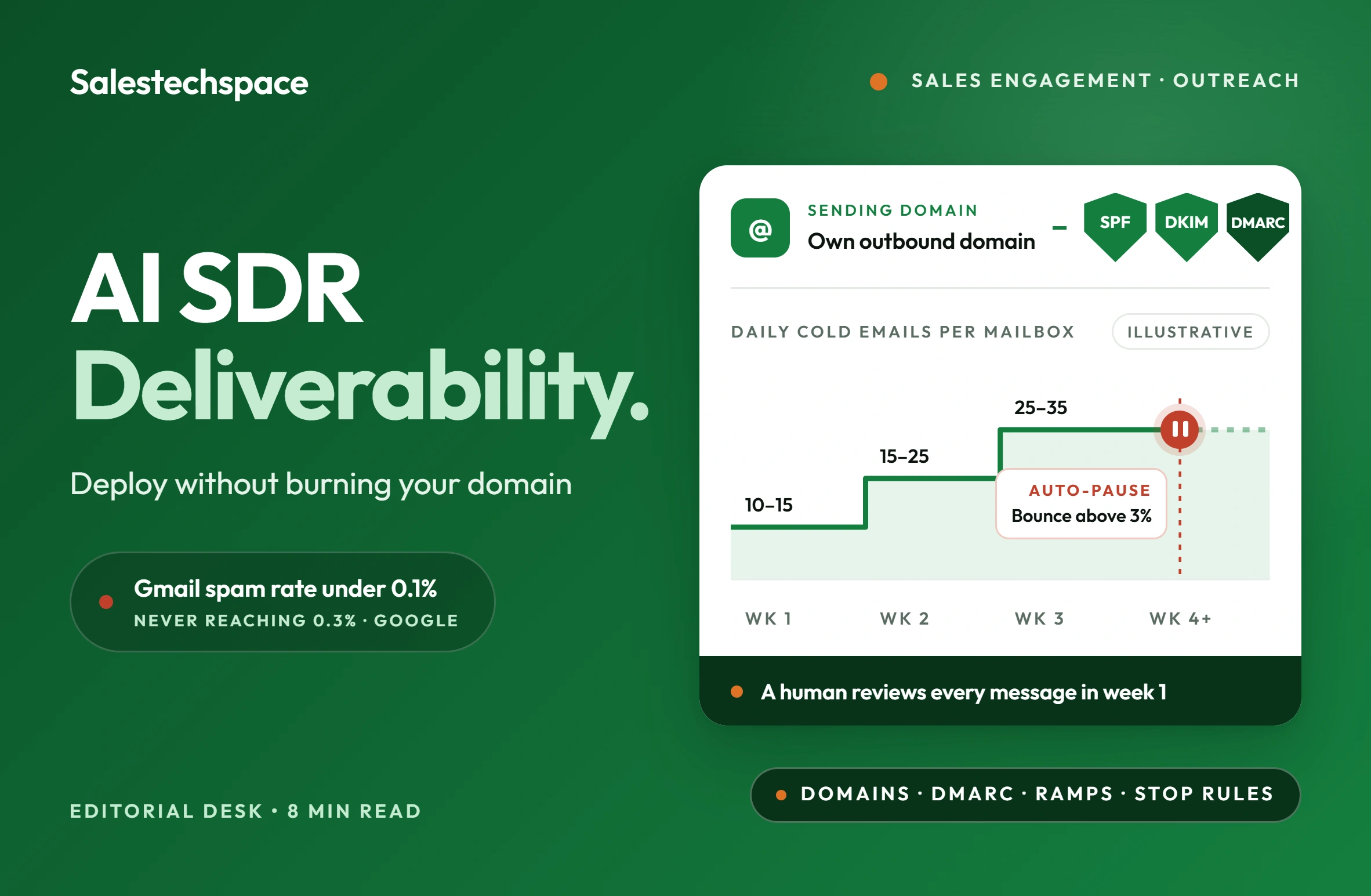
An AI SDR removes the natural speed limit on outbound. A human rep sends a few dozen thoughtful emails a day. An agent can send thousands, around the clock, and it will keep going after the replies turn hostile. That is why AI SDR deliverability is the first thing to plan, not the last. If the rollout damages your sending reputation, the cost lands on every email your company sends, including invoices, renewal notices, and product updates.
This guide is a phased rollout plan. It covers how to separate outbound from your main domain, which authentication records mailbox providers now expect, how fast to ramp volume, which numbers to watch, and when to stop the agent. It is written for sales leaders and RevOps teams who have picked a tool and now need to switch it on safely.
| Quick answer: Protect AI SDR deliverability by sending from separate outbound domains, setting up SPF, DKIM, and DMARC on every one of them, ramping volume slowly per mailbox, keeping the spam complaint rate well under 0.1%, routing every reply to a human within one business day, and writing stop rules that pause the agent automatically when bounce or complaint rates rise. |
Why AI SDR deliverability breaks
Mailbox providers judge senders on behavior: how many messages arrive, how many bounce, how many recipients mark them as spam, and how many people engage. An AI SDR changes all four at once. Three patterns cause most of the damage:
- Volume spikes. A new agent connected to an existing domain can multiply daily sends overnight, which looks like a compromised account.
- Weak lists. Agents are often pointed at large, lightly checked lists, which raises bounces and spam complaints.
- Sameness at scale. Even with personalization, thousands of messages built from one prompt share structure and phrasing that filters learn to spot.
Our comparison of AI SDR tools groups products by how much they do on their own. The more autonomous the tool, the more these controls matter.
What Gmail and Outlook now require
Both major consumer mailbox providers have published sender rules, and B2B teams feel them because many prospects use Google Workspace or Microsoft 365, which apply similar filtering.
Google’s email sender guidelines require all senders to set up SPF or DKIM. Senders of more than 5,000 messages a day to personal Gmail accounts must set up SPF, DKIM, and DMARC with alignment, offer one-click unsubscribe on marketing messages, and keep the spam rate reported in Postmaster Tools below 0.1%, never reaching 0.3%. Since November 2025, Google has stepped up enforcement, with non-compliant mail facing temporary and then permanent rejections.
Microsoft set similar rules for Outlook.com, Hotmail, and Live addresses. From 5 May 2025, domains sending more than 5,000 messages a day must pass SPF, DKIM, and DMARC, according to Microsoft’s announcement. Mail that fails is routed to Junk first, with rejection planned later.
Most outbound programs stay well under 5,000 messages a day per domain. Treat the bulk sender rules as the floor anyway. They describe what filters reward, and an agent can cross the threshold faster than anyone notices.
Phase 1: Set up sending infrastructure (week 0)
Use separate outbound domains.
Never let an AI SDR send from your primary domain. Register one or more secondary domains that are clearly yours, such as a close variant of your brand name, and redirect their websites to your main site. If one gets a poor reputation, your corporate mail keeps flowing.
Authenticate every domain
- SPF: publish a record that lists only the services that send for that domain.
- DKIM: sign mail with a key of at least 1024 bits; 2048 is the common choice.
- DMARC: publish a policy, starting at p=none with reporting turned on, and make sure the From domain aligns with SPF or DKIM.
- Set up a custom tracking domain if your tool tracks clicks, so links do not share a reputation with other customers of the same vendor.
- Register each domain in Google Postmaster Tools and Microsoft SNDS where eligible, so you can see complaint and reputation data.
Size the mailbox pool.
Spread volume across several mailboxes per domain rather than pushing one inbox hard. Many teams cap each mailbox at a few dozen cold emails a day. Work out the mailbox count from your target weekly volume, not the other way around.
Phase 2: Clean the list before the agent sees it.
AI SDR deliverability problems usually start in the data. Before the first send:
- Verify every address with an email verification service and remove invalid and risky results.
- Remove role addresses such as info@ and sales@ unless you have a reason to contact them.
- Suppress current customers, open opportunities, past unsubscribes, and anyone who asked not to be contacted.
- Check the list against your ICP. An agent writing to poor-fit accounts produces complaints, not meetings.
- Record the lawful basis for contact in each region you target, and follow local rules on B2B email.
Your data provider matters here. Our comparison of Apollo, ZoomInfo, and Cognism on MarTechSpace covers how each handles verification.
Phase 3: Ramp volume slowly (weeks 1 to 4)
Warm new mailboxes before cold sending, then increase volume in steps and only move up when the numbers stay healthy.
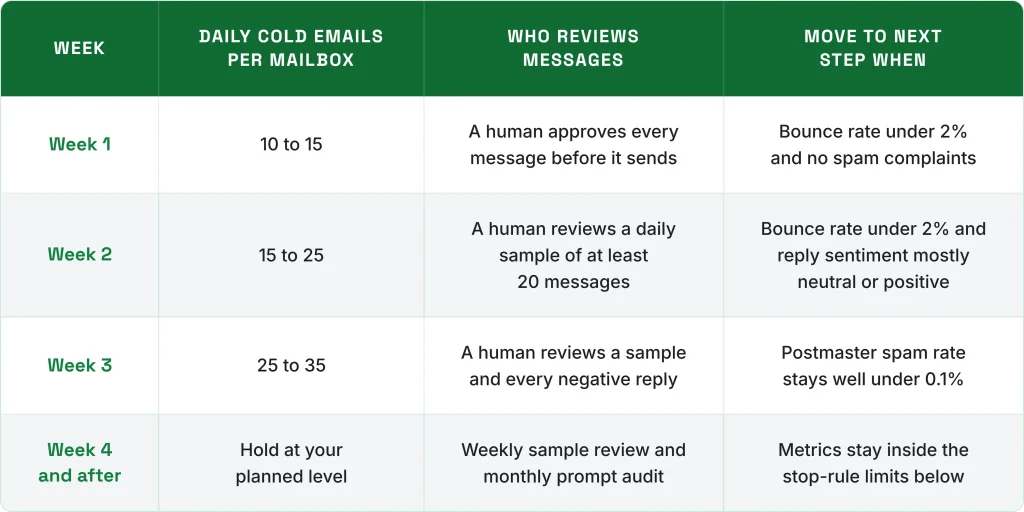
These limits are a cautious starting point, not a rule from any provider. Some teams run higher volumes, but the faster you ramp, the less warning you get before a problem spreads.
Phase 4: Set the agent’s rules of conduct.
AI SDR deliverability is not only a technical setting. The agent’s behavior shapes how recipients react. Write these rules into the tool’s configuration and your playbook:
- Every email names a real sender, your company, and a working way to opt out.
- No more than three or four touches per contact in a sequence, with several days between them.
- No follow-ups to anyone who replies, whatever the reply says. Replies go to a human.
- Personalization must use facts the agent can show a source for, such as a job change or a public announcement. No guessed claims about the prospect’s business.
- Plain text, few links, and no attachments in first-touch emails.
- A fixed list of topics the agent may not discuss, such as pricing promises, legal claims, and competitor statements.
Route replies to humans
Replies are where an AI SDR either earns a meeting or damages trust. Set up routing so that positive and neutral replies reach the account owner within one business day, out-of-office replies pause the sequence until the return date, and unsubscribe or angry replies trigger immediate suppression across every domain and mailbox you run. If your team also runs a sales engagement platform, make sure suppression syncs both ways; our Salesloft review covers how it handles this. Report on reply handling time every week. A fast human reply to an interested prospect is worth more than any extra volume the agent adds.
Stop rules that protect AI SDR deliverability
| Pause the agent automatically when the bounce rate goes above 3% on any mailbox in a day. The Google Postmaster spam rate rises toward 0.1%. A domain appears on a major blocklist. More than one recipient in a day reports the email as spam or threatens a complaint. Inbox placement tests show mail moving to spam at Google or Microsoft. |
Make the pause automatic where the tool allows it, and give one named person the job of investigating before sending resumes. The fix is usually in the list or the message, not the infrastructure. If the same mailbox trips a stop rule twice in a month, retire it and move its share of volume to a fresh, warmed mailbox.
Metrics to watch every week
- Hard bounce rate per mailbox and per domain
- Spam rate in Google Postmaster Tools and complaint data from SNDS where available
- Blocklist status for each sending domain and IP
- Positive reply rate and meetings booked per 100 contacts
- Unsubscribe rate and negative reply rate
- Human response time to positive replies
Do not use open rates to judge the program. Apple Mail Privacy Protection inflates them, and consent rules in Europe are pushing tracking pixels out of cold email. Our sister site explains why in its analysis of email open rates.
Common deployment mistakes
- Connecting the agent to the primary corporate domain on day one.
- Skipping DMARC because outbound volume is low.
- Letting the agent reply to replies, which turns a mild objection into a complaint.
- Buying a large list and loading it all at once.
- Judging success by sends and opens instead of meetings and complaints.
- No named owner for deliverability, so warning signs sit unread.
FAQs:
Can an AI SDR hurt my company’s email deliverability?
Yes. High volume, weak lists, and repeated message patterns can raise bounces and complaints, which damages the reputation of the sending domain. Separate outbound domains limit the damage.
What is a safe spam rate for cold email?
Google asks senders to keep the Postmaster Tools spam rate below 0.1% and never reach 0.3%. Aim well below 0.1%.
Do Gmail bulk sender rules apply to B2B cold email?
The formal rules apply above 5,000 messages a day to personal Gmail accounts, but Google Workspace and Microsoft 365 filters reward the same practices, so treat them as the baseline.
How many cold emails can one mailbox send per day?
There is no official limit. Many teams cap each mailbox at a few dozen cold emails a day and add mailboxes rather than raising volume.
Should an AI SDR reply to prospects automatically?
For most teams, no. Route replies to a human so objections, opt-outs, and interest are handled with care.
How long does a domain take to warm up?
Plan for at least two to four weeks of gradual increases before running at full planned volume.